LogRocket Review 2025: Complete Guide to AI-First Session Replay, Product Analytics & Digital Experience Platform
Quick Summary
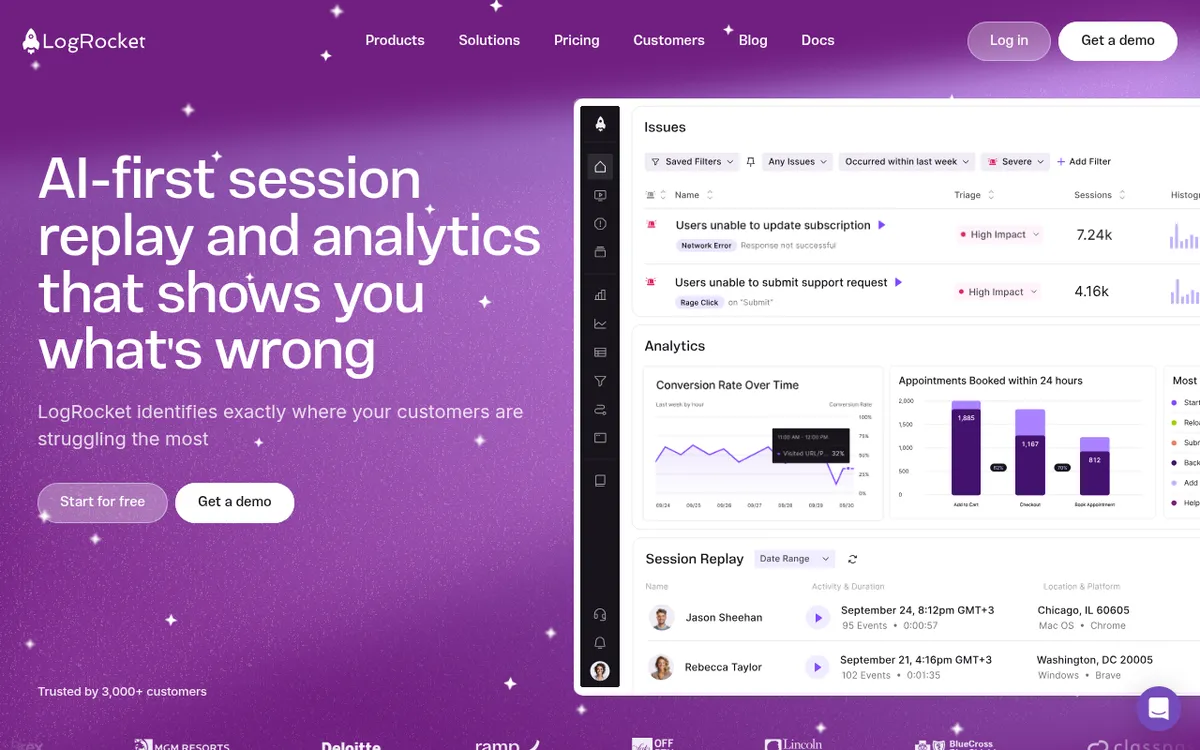
LogRocket is a Boston-based digital experience analytics company founded in 2016 that has evolved from a session replay tool into a comprehensive AI-powered platform for understanding and optimizing user experiences. The platform combines session replay, product analytics, error tracking, and frontend performance monitoring with Galileo AI—a proprietary machine learning system that automatically surfaces the most impactful user issues. Trusted by 3,000+ customers including 7-Eleven, Blue Cross Blue Shield, Cox Automotive, Common App, and Tecovas. Known for developer-focused debugging capabilities and AI-driven issue prioritization.
| Metric | Value |
|---|
| Founded | 2016 |
| Headquarters | Boston, MA (87 Summer St, Boston, MA 02110) |
| Founders | Matthew Arbesfeld (Co-CEO), Ben Edelstein (Co-Founder) |
| Employees | 535-562 |
| Total Funding | $51-55M (Series C, 2022) |
| Latest Valuation | $280M (June 2022) |
| Lead Investors | Delta-v Capital, Battery Ventures, KKR, Matrix Partners |
| Customers | 3,000+ companies |
| Sessions Monitored | 3.5+ billion annually (2022+) |
| Interactions Tracked | 300+ billion annually |
| Major Clients | 7-Eleven, Blue Cross Blue Shield, Cox Automotive, Common App, Tecovas, Copa Airlines, Appfire |
| Pricing | Free (1,000 sessions/mo) to Custom Enterprise |
| Starting Price | $99/month (Team Plan, 10,000 sessions) |
| G2 Rating | ⭐ 4.6/5 (580+ reviews) |
| Capterra Rating | ⭐ 4.9/5 (28 reviews) |
Company History & Background
Origin Story
LogRocket was born from a friendship that began in third grade. Co-founders Matthew Arbesfeld and Ben Edelstein had been building products together since childhood, and after working at various tech companies, they recognized a critical gap in the market: developers and product teams had no effective way to understand what users were actually experiencing in their applications.
The frustration was universal: "Something broke for a user, but we can't reproduce it." This led to endless back-and-forth with customers requesting screenshots, console logs, and steps to reproduce issues—a process that was time-consuming, inefficient, and often unsuccessful.
In 2016, Arbesfeld and Edelstein set out to solve this problem with an audacious goal: make every experience on the web and mobile apps as perfect as possible by giving teams the ability to see, understand, and fix issues affecting their users.
Founders
Matthew Arbesfeld — Co-Founder & CEO
- Computer science background (childhood programming with co-founder)
- Vision: Eliminate guesswork in understanding user experience
- Led product evolution from session replay to AI-powered analytics platform
- CEO Approval Rating: 56/100 (Owler)
Ben Edelstein — Co-Founder
- Computer science background
- Technical architecture leadership
- Co-developed proprietary session replay technology
Corporate Timeline
- 2016: LogRocket founded as session replay platform for developers
- 2018: Launched advanced error tracking and console logging capabilities
- 2019 (March): Raised $15M Series B led by Battery Ventures to expand product offerings
- 2020: Expanded to include product analytics and conversion funnels
- 2021: Introduced performance monitoring capabilities
- 2022 (June): Raised $25M Series C led by Delta-v Capital and Battery Ventures
- 2022: Launched conditional recording feature
- 2022: Surpassed 3.5 billion sessions monitored annually
- 2023 (December): Released Galileo AI—revolutionary AI issue detection system
- 2024 (June): Launched Galileo Highlights—AI session summarization
- 2024 (November): Introduced Ask Galileo—conversational AI for analytics
- 2025: Positioned as #1 session replay and analytics platform on G2
Funding History
Total Raised: $51-55M (estimates vary by source)
| Round | Date | Amount | Lead Investor | Valuation |
|---|
| Seed/Early | 2016-2017 | Undisclosed | Unknown | — |
| Series B | March 2019 | $15M | Battery Ventures | — |
| Series C | June 2022 | $25-40M | Delta-v Capital, Battery Ventures | $280M |
- Delta-v Capital — enterprise software investor
- Battery Ventures — technology-focused venture capital firm
- Matrix Partners — early-stage venture capital
- KKR — global investment firm
Key Milestones
2022 Achievements:
- Doubled sessions monitored to 3.5+ billion annually
- Expanded to 300+ billion user interactions tracked
- Introduced conditional recording for intelligent data capture
2023 AI Revolution:
- Launched Galileo AI with machine learning-based issue detection
- Beta customers (Common App, Tecovas) prevented hundreds of thousands in lost revenue
- Trained models on billions of data points
2024 AI Expansion:
- Galileo Highlights summarizes user sessions automatically
- Galileo Issues for Mobile launched
- Ask Galileo alpha introduced
- Achieved #1 rankings on G2 across multiple categories
LogRocket is an AI-first digital experience analytics platform that combines four core capabilities:
- Session Replay — Pixel-perfect video recordings of user sessions
- Product Analytics — Conversion funnels, path analysis, and behavior insights
- Error Tracking — JavaScript errors, network failures, and crash detection
- Performance Monitoring — Frontend performance metrics and diagnostics
All four capabilities are unified under
Galileo AI, which automatically watches sessions, detects issues, and prioritizes them by business impact.
1. Session Replay
Description: Pixel-perfect video recordings of every user session with complete technical context.
Key Features:
- 100% Accurate Reproduction — See exactly what users saw, pixel-for-pixel
- DOM Playback — Replay HTML/CSS/JS interactions precisely
- Console Logs — Capture all console messages (log, warn, error, debug)
- Network Activity — Record all HTTP requests and responses
- JavaScript Errors — Capture exceptions with full stack traces
- Performance Data — CPU usage, memory consumption, page load times
- User & Device Metadata — Browser, OS, screen size, location
- Custom Logs — Developers can log custom events and data
Advanced Capabilities:
- Redux/MobX/Vuex Integration — Record application state changes
- React/Angular/Vue DevTools — Capture framework-specific debugging data
- GraphQL Support — Track GraphQL queries and mutations
- WebSocket Recording — Capture real-time communication
- Privacy Controls — Automatic PII redaction and custom masking
Platform Support:
- Web (all major browsers)
- React Native (iOS & Android)
- Native iOS (Swift, SwiftUI, Objective-C)
- Native Android (Kotlin, Java, Jetpack Compose)
- Flutter (iOS & Android)
Unique Differentiators vs. Competitors:
- Developer-First Approach — Unlike Hotjar/FullStory which target marketers, LogRocket includes console logs, stack traces, and network data
- Framework Integration — Deep integrations with React, Redux, Angular, Vue.js
- No Sampling — Records 100% of sessions (with conditional recording option)
- Mobile SDK Support — Full native mobile app recording (iOS, Android, React Native, Flutter)
2. Galileo AI — Revolutionary AI-Powered Insights
What is Galileo AI?
Galileo AI is LogRocket's proprietary machine learning system that acts as an "always-on product analyst" for your team. Instead of manually sifting through thousands of sessions or building complex analytics queries, Galileo watches every session, understands user behavior, and automatically surfaces the most impactful issues.
How It Works:
- Data Ingestion — Galileo ingests every click, tap, scroll, error, and network request from all user sessions
- Pattern Recognition — Machine learning models identify patterns of user struggle, frustration, and confusion
- Impact Assessment — Large language models (LLMs) evaluate issue severity based on frequency, user impact, and business context
- Natural Language Descriptions — AI generates human-readable descriptions of each issue
- Continuous Learning — Galileo improves over time based on user feedback (triaging issues as high/low impact)
Training Data:
- Trained on billions of user sessions
- Years of aggregated user feedback on what matters most
- Impact vectors: frequency, user frustration signals, conversion impact, business metrics
Galileo AI Components:
#### Galileo Issues
Proactive Issue Detection
- Automatic Detection — Identifies 5-25 most impactful issues from thousands of potential problems
- Severity Scoring — ML-based severity assessment (requires minimum 3 occurrences)
- Natural Language Descriptions — AI-generated explanations of what's wrong
- Session Replays Attached — Direct links to affected user sessions
- Alert Integration — Daily/weekly digests via Slack, Microsoft Teams, email, or webhooks
- Mobile Support — Full support for iOS and Android native apps
- Focus Areas — Configure Galileo to monitor specific product areas or user segments
Example Issues Detected:
- "Dead clicks on 'Shop Now' button preventing purchases" (Tecovas)
- "Application submission flow breaking for 3% of users" (Common App)
- "Seat selection failures during high-traffic periods" (Copa Airlines)
####
Galileo Highlights
AI Session Summarization
- Session Summaries — Written summaries of user sessions (no watching required)
- Cross-Session Insights — Identifies patterns across multiple sessions
- User Journey Overview — For single users, provides overarching activity summary
- Direct Timestamps — Click links to jump to specific moments in sessions
- Support Integration — Automatically summarizes sessions linked to support tickets (Zendesk, Intercom, Salesforce)
- Volume — Summarizes up to 10 sessions at once
Use Cases:
- Resolve support tickets faster (automatic context for agents)
- Understand churn reasons (summarize churned user sessions)
- Analyze feature adoption (summarize new feature usage)
- Prepare for customer calls (review user history before meetings)
- Enrich feedback data (connect qualitative feedback with behavior)
Availability: Pro and Enterprise plans
#### Galileo Funnel Insights
AI-Powered Conversion Analysis
- Non-Converting User Analysis — AI watches sample of non-converting sessions
- Behavioral Categorization — Groups sessions into common behavior patterns
- Actionable Insights — Describes specific behaviors preventing conversion
- Session Links — Direct access to representative sessions for each insight
- Drop-Off Analysis — Pinpoints exact steps where users abandon funnels
####
Ask Galileo (Alpha)
Conversational Analytics
- Natural Language Queries — Ask questions in plain English
- Quick Answers — No need to build charts or write queries
- Session Replay Context — Ask questions about what you're seeing
- Examples:
- "How many users experienced errors on the checkout page yesterday?" - "What percentage of mobile users completed onboarding?" - "Did users who engaged with this feature return within 7 days?"
Availability: Alpha (join waitlist)
3. Product Analytics
Description: Traditional product analytics with AI enhancement—understand user behavior, conversion, and engagement.
Core Features:
Conversion Funnels:
- Visual funnel builder (drag & drop)
- AI-powered drop-off insights via Galileo
- Session replay integration (watch users who dropped off)
- Segmentation by user properties, device, behavior
- Time-series analysis of funnel performance
- Comparison across cohorts
Path Analysis:
- Visualize user journeys through your product
- Identify most common paths to conversion
- Discover unexpected user flows
- Segment by user characteristics
Dashboards & Charts:
- Out-of-the-box dashboards for common use cases
- Custom dashboard builder
- Time-series graphs and trend analysis
- Segmentation and filtering
- Real-time data updates
User Segmentation:
- Behavioral segmentation (e.g., "users who completed onboarding but didn't convert")
- Property-based segmentation (location, device, browser)
- Custom event tracking
- Cohort analysis
Retention Analysis:
- User retention curves
- Churn analysis
- Feature engagement over time
- Returning user patterns
Key Differentiator: Unlike pure analytics tools (Mixpanel, Amplitude), every metric in LogRocket connects directly to
session replays—you can always drill down to see what individual users actually did.
4. Error Tracking & Monitoring
Description: Comprehensive JavaScript error tracking with full session context.
What's Captured:
Frontend Errors:
- JavaScript exceptions
- Unhandled promise rejections
- Network request failures (4xx, 5xx errors)
- Console errors and warnings
- Resource loading failures (images, scripts, fonts)
- CORS errors
Error Context:
- Full stack traces
- User session replay at time of error
- Console logs leading up to error
- Network requests before/after error
- Browser and device information
- Custom tags and metadata
AI-Powered De-Noising:
- Galileo AI filters out low-impact errors
- Focuses on errors affecting user experience
- Prioritizes by frequency and user impact
- Reduces alert fatigue
Integration with Error Tools: LogRocket integrates bidirectionally with:
- Sentry — Attach LogRocket sessions to Sentry errors
- Bugsnag — Video and logs added to every Bugsnag report
- Rollbar — Link Rollbar errors to LogRocket sessions
- Airbrake — Session URLs in every exception report
Key Differentiator: Most error tracking tools (Sentry, Rollbar) show the error but not what the user was doing. LogRocket shows the
complete context—the user's journey, actions, and environment.
Description: Monitor and analyze frontend performance metrics to identify bottlenecks.
Metrics Tracked:
Page Performance:
- Page load time
- Time to first byte (TTFB)
- First contentful paint (FCP)
- Largest contentful paint (LCP)
- Time to interactive (TTI)
- Cumulative layout shift (CLS)
Resource Performance:
- Script load times
- Image load times
- CSS load times
- Third-party resource impact
Browser Metrics:
- CPU usage
- Memory consumption
- Network waterfall charts
- Frame rate (FPS)
User Experience Impact:
- Correlate performance with conversion
- Identify slow experiences causing churn
- Compare performance across segments
- Track performance changes over time
Charts & Dashboards:
- Performance timelines
- Aggregated performance metrics
- Custom performance dashboards
- Alerts for performance degradation
6. UX Analytics
Description: Understand user behavior patterns and identify friction points.
Frustration Detection:
- Rage Clicks — Repeated rapid clicking (broken buttons, non-responsive elements)
- Dead Clicks — Clicks on non-interactive elements
- Error Clicks — Clicks resulting in errors
- U-Turns — Users immediately leaving pages
User Sentiment Indicators:
- Scroll patterns (rage scrolling)
- Mouse movements indicating confusion
- Extended hesitation before actions
- Repeated form field edits
Engagement Metrics:
- Time on page
- Scroll depth
- Feature usage frequency
- Click heatmaps (via integrations)
Key Differentiator: Galileo AI automatically surfaces these patterns—you don't need to manually tag events or configure tracking. The AI watches for frustration and flags it proactively.
Integrations (40+ Built-In)
LogRocket's integration ecosystem is one of its strongest features, connecting with tools across the entire software development lifecycle.
Categories:
#### Customer Support (Galileo Highlights Integration)
- Zendesk — Auto-summarize sessions linked to support tickets
- Intercom — Session summaries in customer conversations
- Salesforce Service Cloud — CRM integration with session context
- Drift — Chat integration with session replay
- Help Scout — Support desk integration
####
Issue & Project Management
- Jira (Advanced Integration) — Create tickets from sessions, track ticket status in LogRocket
- Linear — Share issues directly to Linear
- GitHub — Create GitHub issues with session links
- GitLab — Ticket creation with replay links
- Trello — Card creation from sessions
- Asana — Task creation integration
- Azure DevOps — Work item integration
- ClickUp — Task management integration
####
Error Monitoring
- Sentry — Bidirectional: see LogRocket sessions in Sentry, Sentry errors in LogRocket
- Bugsnag — Attach session URLs to every exception
- Rollbar — Link errors to sessions
- Airbrake — Session URLs in error reports
- Raygun — Error tracking integration
####
Observability & Backend Monitoring
- Datadog — Trace frontend issues to backend
- New Relic — Full-stack observability
- Dynatrace — Application performance monitoring
- AppDynamics — Business transaction correlation
- Elastic (ELK Stack) — Log aggregation integration
- Sumo Logic — Log management integration
####
A/B Testing & Feature Flags
- Optimizely — Experiment result analysis
- Google Optimize — A/B test integration
- AB Tasty — Campaign data ingestion
- LaunchDarkly — Feature flag tracking (via custom integration)
####
Analytics & Data
- Google Analytics — Add LogRocket session URLs as custom dimensions
- Segment — Send LogRocket events to Segment
- Amplitude — Product analytics integration
- Mixpanel — Behavioral analytics sync
- Heap — Auto-capture integration
- Adobe Analytics — Session URL custom variables
####
Customer Feedback
- Qualtrics — Survey response integration
- Medallia — Customer experience platform
- Wootric — NPS feedback integration
- Delighted — CSAT survey integration
- Canny — Feature request tracking
- UserTesting — User research integration
####
Voice of Customer
- App Store Reviews — Connect reviews with in-app behavior
- Google Play Reviews — Rating integration
- Trustpilot (via custom integration)
####
Data Warehouses
- BigQuery — Export session data for analysis
- Snowflake (via custom integration)
- Redshift (via custom integration)
####
Communication
- Slack — Issue alerts and session sharing
- Microsoft Teams — Galileo Issues digests
- Email — Automated issue reports
- Webhooks — Custom integrations
####
Developer Tools
- React DevTools — State inspection
- Redux DevTools — Redux state tracking
- Vue DevTools — Vue state monitoring
- React Native Debugger — Mobile debugging
Pricing Plans 2025
Free Tier — Developer Plan
Price: $0/month
Includes:
- 1,000 sessions/month
- 30-day data retention
- All core features:
- Session replay - Product analytics - Error tracking - Performance monitoring
- Single user
- Community support
- Best For: Individual developers, small projects, testing LogRocket
Limitations:
- No Galileo AI features
- Limited session volume
- Short data retention
- No team collaboration
Team Plan
Price: Starting at
$99/month (annual billing)
Alternative: Available month-to-month with pricing variation
Includes:
- 10,000 sessions/month (base tier, scales with usage)
- 90-day data retention
- 5-10 team seats
- All features from Free tier
- Team collaboration
- Email support
Best For: Small teams, startups, growing products
Scalability:
- Pricing scales based on session volume
- Additional seats available
- Custom session limits available
Professional Plan
Price: Starting at
$349/month (custom pricing based on volume)
Includes:
- Starts with 10,000 sessions/month (typically 50,000-250,000+)
- 6-month data retention
- AI-Powered Features:
-
Galileo Issues — Automatic issue detection -
Galileo Highlights — AI session summarization -
Galileo Funnel Insights — AI conversion analysis
- Advanced integrations
- Performance monitoring
- Priority support
- Unlimited seats
- Custom dashboards
Best For: Growing companies, product teams, engineering teams with serious debugging needs
Typical Use Case:
- 250,000 web sessions/month
- 175,000 mobile sessions/month
- 20 team seats
Sample Pricing (from verified buyers):
- List Price: ~$36,000/year
- Negotiated Price: ~$29,000/year (20% discount)
- Breakdown: ~$1,167/month for web + $1,250/month for mobile
Enterprise Plan
Price: Custom (contact sales)
Includes:
- Unlimited sessions (typically millions per month)
- 12+ month data retention (customizable)
- Full Galileo AI Suite
- Advanced security:
- SSO/SAML - Custom data retention policies - Dedicated infrastructure options - GDPR/SOC 2 compliance support
- Dedicated success manager
- Custom SLAs
- Priority support (24/7 optional)
- Advanced integrations
- Custom contracts
- Volume discounts
Best For: Large enterprises, high-traffic applications, companies with strict security/compliance requirements
Typical Enterprise Pricing:
- Average Annual Cost: ~$38,000
- Range: $25,000 - $150,000+ depending on:
- Session volume - Data retention requirements - Support level - Security features
Pricing Insights from Real Buyers
Negotiation Leverage (via Vendr.com):
- Average discount: 17% (~$1,300 savings)
- Tactics that work:
- Multi-year commitments (3-year contracts) - Lack of usage on current plan - Competitive alternatives (FullStory, Hotjar) - Case study participation - End-of-quarter timing
Sample Discount:
- One company negotiated 18% annual discount on 36-month contract
- Another reduced renewal from $13K to $11K without concessions
Free Trial:
- 14 days free for Team and Professional plans
- Full feature access during trial
- No credit card required
Licensing & Privacy
Data Privacy & Security
Compliance:
- GDPR Compliant
- SOC 2 Type II Certified
- CCPA Compliant
- HIPAA-ready (Enterprise plans)
Automatic PII Redaction:
- Credit card numbers
- Social security numbers
- Email addresses (configurable)
- Phone numbers
- Passwords and sensitive inputs
Custom Redaction:
- CSS class-based redaction
- Element-specific masking
- Network request sanitization
- Console log filtering
- Custom redaction rules
Data Storage:
- Data stored in secure cloud infrastructure
- Encryption in transit (TLS 1.2+)
- Encryption at rest
- Regular security audits
Privacy Controls:
- Session sampling (conditional recording)
- IP address anonymization
- User consent management
- Data deletion on request
AI Privacy
Galileo AI Security:
- Customer data fully anonymized
- Only generic action counts used for severity scoring
- No customer-identifiable data used for model training
- LogRocket and downstream providers (OpenAI, Google Cloud) are GDPR/SOC 2 compliant
- Redacted elements not visible to AI
Technical Specifications
Web SDK
Installation: ``
javascript npm install logrocket // or
`
Initialization:
`
javascript import LogRocket from 'logrocket'; LogRocket.init('your-app-id/your-app-slug');
`
Supported Browsers:
- Chrome (latest 2 versions)
- Firefox (latest 2 versions)
- Safari (latest 2 versions)
- Edge (Chromium-based)
- Opera
- Mobile browsers (iOS Safari, Chrome Mobile, Samsung Internet)
Framework Support:
- Vanilla JavaScript
- React
- Vue.js
- Angular
- Svelte
- Next.js
- Nuxt.js
- Gatsby
- Ember.js
State Management Integration:
logrocket-react
)
MobX
Vuex
NgRx
Zustand
Mobile SDKs
Platforms:
- iOS (Swift, SwiftUI, Objective-C)
- Android (Kotlin, Java, Jetpack Compose)
- React Native
- Flutter
React Native Installation:
`
bash npm install @logrocket/react-native
`
Initialization:
`
javascript import LogRocket from '@logrocket/react-native';
LogRocket.init('your-app-id');
`
Minimum Requirements:
- Android: API 25+ (Android 7.1+)
- iOS: iOS 11.0+
- React Native: 0.60+
- Flutter: Flutter 2.0+
Features Supported:
- Session replay (native UI capture)
- Console logs
- Network requests
- Crashes and exceptions
- Custom events
- User identification
- Performance metrics
- View redaction
React Native New Architecture:
- Fully supported as of SDK version 1.46.4
- Default in React Native 0.76+
Network & API
Automatic Capture:
- XHR requests
- Fetch API
- GraphQL queries/mutations
- WebSocket connections
- HTTP/HTTPS requests
- Request/response bodies
- Headers
- Timing information
Sanitization:
`
javascript LogRocket.init('app-id', { network: { requestSanitizer: (request) => { if (request.headers['Authorization']) { request.headers['Authorization'] = 'REDACTED'; } return request; }, responseSanitizer: (response) => { // Sanitize response data return response; } } });
`
Console Logging
Automatic Capture:
console.log()
console.warn()
console.error()
console.info()
console.debug()
Configuration:
`
javascript LogRocket.init('app-id', { console: { isEnabled: { log: true, info: true, warn: true, error: true, debug: false }, shouldAggregateConsoleErrors: true } });
`
Custom Events & User Identification
User Identification:
`
javascript LogRocket.identify('user-id-123', { name: 'Jane Doe', email: 'jane@example.com', subscriptionType: 'Pro', // Any custom traits });
`
Custom Events:
`
javascript LogRocket.track('Purchase Completed', { revenue: 99.99, productSku: '12345', category: 'Electronics' });
`
Page Tagging:
`
javascript LogRocket.tagPage('Checkout/Payment');
``
User Reviews & Reputation
G2 Reviews
Overall Rating: ⭐
4.6/5 (580+ reviews)
Breakdown:
- Ease of Use: 4.5/5
- Quality of Support: 4.7/5
- Ease of Setup: 4.6/5
- Meets Requirements: 4.5/5
G2 Awards & Rankings:
- #1 Session Replay Software (Enterprise, Mid-Market, Small Business)
- Leader in Software Testing Tools
- High Performer in Application Performance Monitoring
- Fastest Implementation in Session Replay
- Best Results in Session Replay
Positive Feedback
Most Praised Features:
"The ability to view deep technical insights along with quantitative and qualitative data to aid in improving the overall user experience. The proactive nature of the dashboard highlighting potential trouble areas so that I don't have to go looking for them."
— Tim B., CEO, Small Business (G2, Nov 2025)
"LogRocket's Galileo AI gives us the leverage to say, 'Hey, there's issues… here's why we should prioritize resolving these issues.'"
— Eric Jones, Frontend Engineering Manager, Tecovas
- Developer-Friendly Integration
"LogRocket is very easy to use and simple to integrate into an existing app. It provides an excellent overview of how users interact with the product and helps identify parts of the UI where they might be struggling. It's also a great tool for debugging since you can see exactly what the user experienced before an issue occurred."
— Milan M., Software Engineer, Small Business (G2, Nov 2025)
"It's been really helpful for our team overall in understanding what is going on with the way users interact with our product. I highly recommend using it for product teams. It is really easy to take a look through recent sessions each day and understand where users are getting stuck and which issues we might need to solve urgently."
— Emily T., Product Manager, E-Learning (Capterra, 1-2 years use)
- Better Than FullStory at Lower Cost
"I was hesitant at first when my company changed from FullStory to LogRocket because I was already an expert using FS, but I was surprised after my first week using LR of how powerful it is and how detailed the information can be. Just look at the pricing of FullStory and LogRocket, both basically provide the same service but this one does so much more and at a tenth of the price of FullStory."
— Product Manager (Capterra)
"LogRocket is an essential part of our business. We review it each morning to glean information about how the previous night of service went throughout our userbase and it catches things that users do not report more times than not."
— Software Advice Review
- Customer Support Excellence
"Customer service was exceptional. They went above and beyond."
— Multiple reviewers
Negative Feedback & Concerns
Common Complaints:
"I love using this tool but may have to find a different tool because of price."
— Garwin P., Team Lead, Computer Software (G2, Mar 2021)
"Some sessions will replay in an odd way making it difficult to assess what is going on—though this is not due to LogRocket and more due to the browser settings for the user within the session."
— Tim B., CEO (G2, Nov 2025)
"What is represented in the session log is not a 100% true representation of what the user saw."
— Software Advice Review
- Data Masking Overzealousness
"Sometimes LogRocket masks certain data that isn't actually sensitive, which can make it harder to fully understand what happened in a user session."
— Milan M., Software Engineer (G2, Nov 2025)
- User Interface Complexity
"The user interface could be a little more user-friendly. I understand it is a tech tool and as such it can't be super simple, but smoother edges and maybe slightly larger buttons could help a bit."
— Product Manager (Capterra)
"It gives a lot more detail than other tools, at first it might look challenging because it has so many options, but you can get used to it in matter of a few days."
— Multiple reviewers
"It doesn't support canvas, and one of the most significant features of our product is related to a Mapbox canvas map."
— G2 Review
- Ionic Framework Issues on iOS
"There are some issues still with the ionic framework on iOS, but I think this is more on Safari than the LogRocket folks."
— Capterra Review
Capterra Reviews
Overall Rating: ⭐
4.9/5 (28 reviews)
Breakdown:
- Value for Money: 4.8/5
- Functionality: 4.9/5
- Ease of Use: 4.7/5
- Customer Support: 5.0/5
TrustRadius Reviews
Overall Rating: ⭐
8.5/10
Most Valued Features:
- Session replay quality
- Developer debugging tools
- Integration ecosystem
- Error tracking accuracy
Overall Assessment
Strengths:
- Consistently praised for technical depth and developer focus
- Customer support rated excellent across all platforms
- Galileo AI receiving strong positive feedback from early adopters
- Integration ecosystem highly valued
- Price/value ratio competitive vs. FullStory
Weaknesses:
- Pricing can be steep for small teams/startups
- Session replay accuracy occasionally imperfect (browser limitations)
- UI complexity for non-technical users
- Learning curve for full feature utilization
Competitive Analysis
LogRocket vs. Major Competitors
| Feature | LogRocket | FullStory | Hotjar | Smartlook | Sentry + Replay |
|---|
| Primary Focus | Dev debugging | UX analytics | UX/Marketing | UX/Marketing | Error tracking |
| Session Replay | ✅ Pixel-perfect | ✅ Detailed | ✅ Basic | ✅ Good | ✅ Basic |
| Console Logs | ✅ Full | ⚠️ Limited | ❌ No | ⚠️ Limited | ✅ Full |
| Network Requests | ✅ Full | ⚠️ Limited | ❌ No | ⚠️ Limited | ⚠️ Limited |
| Error Tracking | ✅ Advanced | ⚠️ Basic | ❌ No | ⚠️ Basic | ✅ Advanced |
| AI Features | ✅ Galileo AI | ✅ Predictive | ❌ No | ❌ No | ⚠️ Limited |
| Product Analytics | ✅ Full | ✅ Advanced | ⚠️ Basic | ⚠️ Basic | ❌ No |
| Performance Monitoring | ✅ Frontend | ⚠️ Limited | ❌ No | ⚠️ Limited | ⚠️ Backend focus |
| Mobile Apps | ✅ Native SDKs | ✅ Native SDKs | ⚠️ Limited | ✅ Native SDKs | ✅ Native SDKs |
| Heatmaps | ⚠️ Via integrations | ✅ Built-in | ✅ Built-in | ✅ Built-in | ❌ No |
| Surveys/Feedback | ⚠️ Via integrations | ✅ Built-in | ✅ Built-in | ✅ Built-in | ❌ No |
| Framework Integration | ✅ Redux/Vuex/etc | ⚠️ Limited | ❌ No | ⚠️ Limited | ⚠️ Limited |
| Starting Price | $99/mo | $$ Custom | $39/mo | $55/mo | Free |
| Free Tier | 1,000 sessions | 1,000 sessions | 35 sessions/day | 3,000 sessions | 5,000 errors |
| G2 Rating | 4.6/5 (580+) | 4.5/5 (380+) | 4.3/5 (300+) | 4.6/5 (850+) | 4.6/5 (500+) |
Detailed Competitor Comparisons
#### LogRocket vs. FullStory
FullStory Strengths:
- More advanced behavioral analytics
- AI-driven predictive analytics
- Better heatmaps and click maps
- Stronger for UX research teams
- More polished UI for non-developers
LogRocket Strengths:
- Better developer debugging tools (console logs, network data, stack traces)
- Framework-specific integrations (Redux, Vuex, MobX)
- Better error tracking
- More affordable (often "1/10th the price" per reviews)
- Galileo AI for automatic issue detection
When to Choose FullStory:
- UX/design-focused team
- Need predictive analytics
- Want built-in heatmaps
- Budget is not a concern
When to Choose LogRocket:
- Developer/engineering-focused team
- Need deep debugging context
- Want error tracking + session replay in one tool
- More budget-conscious
#### LogRocket vs. Hotjar
Hotjar Strengths:
- More affordable ($39-171/mo vs $99+)
- Better for small businesses
- Built-in surveys and feedback tools
- Easier for non-technical users
- Built-in heatmaps
- 1-on-1 user interviews feature
LogRocket Strengths:
- Session replay + technical debugging
- Console logs and network data
- Error tracking
- Product analytics
- AI-powered insights
- Better for complex web/mobile apps
When to Choose Hotjar:
- Small business/startup with limited budget
- Marketing/UX team without developers
- Need simple user feedback collection
- Want basic heatmaps
When to Choose LogRocket:
- Have developers on team
- Need to debug technical issues
- Complex web application
- Want AI-powered issue detection
#### LogRocket vs. Smartlook
Smartlook Strengths:
- More affordable ($55-249/mo)
- Larger free tier (3,000 sessions)
- Built-in heatmaps
- Event-based analytics
- Simpler interface
LogRocket Strengths:
- Better developer debugging tools
- Galileo AI
- Error tracking
- Framework integrations
- Performance monitoring
When to Choose Smartlook:
- Mid-sized team with budget constraints
- Need good balance of features and price
- Want heatmaps built-in
When to Choose LogRocket:
- Developer-focused team
- Need AI-powered insights
- Complex debugging requirements
#### LogRocket vs. Sentry (with Session Replay)
Sentry Strengths:
- Best-in-class error tracking
- Open-source option
- Large community
- Better for backend error monitoring
- More affordable for error tracking alone
LogRocket Strengths:
- Session replay primary focus
- Product analytics included
- Better session replay quality
- Galileo AI insights
- Better UX analytics
When to Choose Sentry:
- Primary need is error tracking
- Want open-source option
- Backend-heavy application
- Already using Sentry
When to Choose LogRocket:
- Primary need is session replay
- Want all-in-one UX platform
- Frontend-focused team
- Need AI-powered insights
Key Differentiators Summary
LogRocket's Unique Strengths:
- Developer-First Philosophy
- Built by developers for developers - Complete debugging context (logs, errors, network, state) - Framework-specific integrations
- Only platform with AI-powered automatic issue detection - Natural language descriptions of problems - Proactive alerting vs. reactive analysis
- Session replay + analytics + errors + performance - No need for separate tools - Unified view of user experience
- Framework Deep Integration
- Redux, Vuex, MobX state tracking - React/Vue/Angular DevTools integration - Framework-aware debugging
- Full iOS/Android native SDKs - React Native, Flutter support - Mobile-specific performance monitoring
Use Cases & Best Fits
Ideal For:
#### 1. Product Engineering Teams
- Debug production issues faster
- Reproduce bugs without user assistance
- Understand technical failures
- Monitor performance degradation
- Track deployment impact
Example: Common App uses LogRocket to identify critical issues affecting millions of college applicants, preventing application submission failures.
#### 2. SaaS Companies
- Optimize conversion funnels
- Reduce churn
- Understand feature adoption
- Debug user-reported issues
- Monitor product health
Example: Tecovas discovered dead clicks on checkout buttons that would have cost "hundreds of thousands of dollars" without LogRocket's Galileo AI.
#### 3. E-commerce Platforms
- Identify checkout abandonment causes
- Debug payment processing issues
- Optimize mobile shopping experience
- Reduce cart abandonment
- Monitor seasonal traffic issues
Example: 7-Eleven optimizes self-checkout conversion efficiency using LogRocket.
#### 4. Customer Support Teams
- Instantly understand user-reported issues
- Reduce ticket resolution time
- Provide better support experiences
- Identify common pain points
- Train support agents
Use Case: Support teams use Galileo Highlights to get automatic summaries of user sessions linked to support tickets.
#### 5. Mobile App Development
- Debug iOS/Android-specific issues
- Monitor app performance across devices
- Track crash causes
- Optimize mobile UX
- Monitor network issues
####
6. Financial Services / Healthcare
- Debug complex workflows
- Monitor compliance-critical flows
- Ensure form completion
- Track authentication issues
- HIPAA-ready options (Enterprise)
Example: Blue Cross Blue Shield of Massachusetts uses LogRocket to optimize digital experiences.
#### 7. High-Traffic Applications
- Monitor performance at scale
- Detect issues affecting user segments
- Optimize for different devices/browsers
- Track edge cases
- Monitor third-party integrations
Example: Copa Airlines discovered hidden seat purchase failures during high-traffic periods.
Not Recommended For:
- Hotjar or Smartlook may be better fits - LogRocket's strength is technical debugging
- Overkill for simple content sites - Google Analytics + Hotjar likely sufficient
- Very Small Startups (Pre-Product/Market Fit)
- Free tier works, but paid plans may be premature - Focus budget elsewhere until PMF
- Many features require technical knowledge - Simpler tools like Hotjar easier to use
- Pure Backend Services (No Frontend)
- LogRocket is frontend-focused - Use APM tools (Datadog, New Relic) instead
- Budget-Constrained Teams Needing Only Heatmaps
- Hotjar or Microsoft Clarity (free) better options
Pros & Cons
Pros
- ✅ Complete Technical Context
- Console logs, network requests, errors, stack traces - No other session replay tool matches this depth - Debugging is 10x faster
- ✅ Galileo AI — Game Changer
- Automatically surfaces most impactful issues - Saves hours of manual analysis - Natural language descriptions - Continuous learning and improvement
- Session replay + analytics + errors + performance - Replace multiple tools with one - Unified view of user experience
- ✅ Framework-Deep Integration
- Redux, Vuex, MobX state tracking - React/Vue/Angular DevTools - Framework-aware debugging
- ✅ Excellent Mobile Support
- Native iOS/Android SDKs - React Native, Flutter support - Mobile-specific features (crash tracking, performance)
- Connects with entire tech stack - Bidirectional integrations (Sentry, Jira, etc.) - Seamless workflow integration
- Built by developers for developers - Easy SDK integration - Excellent documentation
- ✅ Excellent Customer Support
- Consistently praised across all review platforms - Responsive and helpful - 5.0/5 on Capterra
- ✅ Better Value Than FullStory
- Often 1/10th the price for similar features - More generous free tier (1,000 vs. 1,000 sessions) - Better for budget-conscious teams
- SOC 2 Type II certified - GDPR compliant - Automatic PII redaction - Custom privacy controls
- Intelligently capture only relevant sessions - Control costs - Privacy-friendly
- Handles billions of sessions annually - Minimal performance impact on apps - Reliable infrastructure
Cons
- Professional plans start at $349/mo - Can reach $38K+ annually for enterprises - May be expensive for small teams/startups
- ❌ Session Replay Occasionally Imperfect
- Browser limitations can cause inaccuracies - Canvas elements not fully supported - Some dynamic content may not replay perfectly
- Many advanced features - Can feel overwhelming initially - Best utilized by technical users
- Not as polished as FullStory - Can feel cluttered - Some users want simpler interface
- ❌ Overzealous Data Masking
- Sometimes redacts non-sensitive data - Can make debugging harder - Requires custom configuration
- Must integrate with other tools - Competitors (Hotjar, FullStory) have built-in heatmaps
- ❌ No Built-in Surveys/Feedback Tools
- Must use integrations (Qualtrics, etc.) - Hotjar has this built-in
- Some features platform-specific - Ionic framework issues on iOS (Safari-related) - React Native New Architecture compatibility (improving)
- ❌ Data Retention on Lower Tiers
- Free tier: 30 days - Team tier: 90 days - Need Professional+ for longer retention
- Unlike Sentry, no self-hosted option - Cloud-only service
Final Verdict
Rating: 4.6/5 ⭐
LogRocket has successfully positioned itself as the
#1 AI-first session replay and product analytics platform for developers. What began as a simple session replay tool has evolved into a comprehensive digital experience platform that genuinely solves the hardest problem in software: understanding why users struggle.
Core Strengths:
The Galileo AI system is revolutionary—it's not an incremental improvement, it's a paradigm shift. Instead of manually hunting through thousands of sessions or building complex queries, Galileo watches everything, understands context, and tells you exactly what's wrong. Early adopters (Common App, Tecovas, Copa Airlines) have prevented hundreds of thousands in lost revenue using Galileo's automatic issue detection.
The developer-first philosophy sets LogRocket apart from marketing-focused competitors. Console logs, network requests, stack traces, Redux state—LogRocket captures the complete technical context that developers actually need to debug issues. This isn't session replay for marketers; it's session replay for engineers.
The all-in-one approach eliminates tool sprawl. Session replay + product analytics + error tracking + performance monitoring in one platform means unified insights and faster debugging. Teams can replace FullStory + Sentry + Mixpanel with LogRocket alone.
Concerns:
Pricing is the biggest barrier. While LogRocket offers better value than FullStory, the Professional tier ($349+/month) may be steep for small teams. However, verified buyers report 17%+ discounts are negotiable, bringing costs down significantly.
UI complexity is real—LogRocket has a lot of features, and the interface can feel overwhelming compared to simpler tools like Hotjar. However, this is the trade-off for technical depth. Power users love the advanced features; non-technical users may struggle.
Session replay accuracy is occasionally imperfect (browser limitations, canvas elements), but this affects all session replay tools. LogRocket is transparent about limitations and continuously improving.
Recommendation
Use LogRocket if:
- You're a developer/engineering team building web or mobile applications
- You need deep debugging context (logs, errors, network, state)
- You want AI to automatically surface issues (Galileo is worth it)
- You value all-in-one platform over multiple specialized tools
- You want better value than FullStory without sacrificing features
- You need mobile app support (native iOS/Android/React Native/Flutter)
- You have budget for professional tools ($99+/month)
Look elsewhere if:
- You're a marketing/UX team without developers → Try Hotjar ($39/mo, easier to use)
- You only need heatmaps → Try Hotjar or Microsoft Clarity (free)
- You're a very small startup (pre-PMF) → Use free tier or wait until PMF
- You only need error tracking → Try Sentry (open-source option)
- You need predictive analytics focus → Try FullStory (if budget allows)
- Your primary need is backend monitoring → Try Datadog or New Relic
Better Alternatives by Specific Use Case
- Best Budget Option: Hotjar ($39/mo) — Simple, affordable, built-in heatmaps
- Best for UX Research: FullStory — Predictive analytics, advanced behavioral insights
- Best Free Option: Microsoft Clarity — Free forever, heatmaps, session replay
- Best for Error Tracking Only: Sentry — Open-source, excellent error tracking
- Best for Backend Monitoring: Datadog, New Relic — Full-stack observability
- Best for Marketing Teams: Hotjar — Surveys, feedback, heatmaps, user-friendly
Quick Reference
| Category | Details |
|---|
| Website | https://logrocket.com |
| Founded | 2016, Boston, MA |
| Founders | Matthew Arbesfeld (CEO), Ben Edelstein |
| Employees | 535-562 |
| Funding | $51-55M (Series C led by Delta-v Capital, Battery Ventures) |
| Valuation | $280M (June 2022) |
| Customers | 3,000+ companies |
| Sessions Monitored | 3.5+ billion annually |
| Core Features | Session Replay, Product Analytics, Error Tracking, Performance Monitoring, Galileo AI |
| Free Tier | 1,000 sessions/month, 30-day retention |
| Team Plan | Starting at $99/month (10,000 sessions) |
| Professional Plan | Starting at $349/month (AI features, custom sessions) |
| Enterprise Plan | Custom pricing (unlimited sessions, advanced security) |
| Platforms | Web, iOS, Android, React Native, Flutter |
| Integrations | 40+ (Jira, Slack, Zendesk, Sentry, Datadog, Intercom, GitHub, etc.) |
| AI Features | Galileo Issues, Galileo Highlights, Galileo Funnel Insights, Ask Galileo (Alpha) |
| Mobile SDKs | iOS (Swift, SwiftUI, Objective-C), Android (Kotlin, Java), React Native, Flutter |
| Security | SOC 2 Type II, GDPR, CCPA, HIPAA-ready (Enterprise) |
| G2 Rating | 4.6/5 (580+ reviews) |
| Capterra Rating | 4.9/5 (28 reviews) |
| Free Trial | 14 days (Team & Professional plans) |
| Support | Email, chat, community forums |
| Contact | https://logrocket.com/contact |
Galileo AI in Action — Real Customer Results
Common App — Preventing Application Failures
"In the past, we might hear that something was wrong with our application submission flows, but figuring out the root cause and its impact was a time-consuming process, and we couldn't be sure that the changes we made would move the needle. LogRocket's AI capabilities easily allow teams across Common App to proactively identify the highest-impact issues and their causes in the areas of our app we care about the most."
— Dave Tiss, Director of Development, Common App
Impact: Identified critical issues affecting millions of college applicants before they caused widespread problems.
Tecovas — Saving Hundreds of Thousands in Revenue
"LogRocket's Galileo AI quickly surfaced a customer usability problem that would have otherwise flown under the radar: dead clicks on their 'Shop Now' and 'Checkout' buttons that could have cost Tecovas hundreds of thousands of dollars."
— Eric Jones, Frontend Engineering Manager, Tecovas
"LogRocket's Galileo AI gives us the leverage to say, 'Hey, there's issues… here's why we should prioritize resolving these issues.' If decisions are made when you're not all looking at the same data and the same roadmap, you create a lot of inefficiency, churn, and rework."
— Eric Jones, Tecovas
Impact: Prevented massive revenue loss during holiday season by catching broken checkout buttons.
Copa Airlines — Fixing Hidden Seat Purchase Failures
During early preview of Galileo AI, Copa Airlines quickly uncovered hidden issues that prevented seat purchases during high-traffic periods—issues that traditional analytics would have missed.
Impact: Fixed revenue-impacting bugs that only affected specific user segments.
Review last updated: December 2025
Data sources: Official LogRocket website, G2, Capterra, TrustRadius, Crunchbase, PitchBook, Tracxn, verified buyer reports, LogRocket documentation, industry analysis