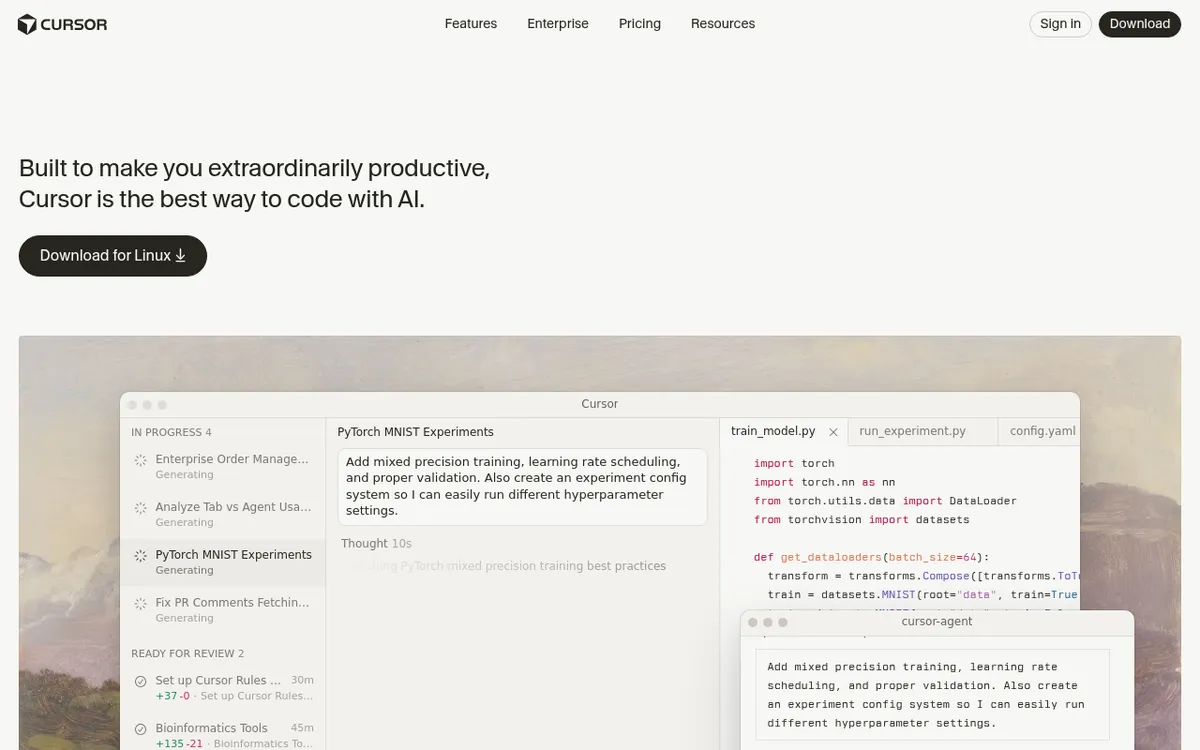
Cursor by Anysphere: The AI-First Code Editor Transforming Development in 2025
In the rapidly evolving landscape of software development, artificial intelligence has moved from a nice-to-have feature to an essential productivity multiplier. While traditional code editors offer basic AI assistance as an afterthought, Cursor by Anysphere takes a fundamentally different approach—it's built from the ground up with AI at its core, creating an entirely new paradigm for how developers write, edit, and manage code.
Cursor isn't just another code editor with AI bolted on; it's a complete reimagining of the development experience. Built on the familiar foundation of VS Code, it integrates advanced language models like GPT-4, Claude, and Gemini directly into your coding workflow, enabling natural language interactions that feel more like collaborating with an intelligent pair programmer than wrestling with traditional development tools.
As we navigate 2025's competitive development landscape, where 75% of Fortune 500 companies now mandate AI-powered coding tools for their development teams, Cursor has emerged as the clear frontrunner in the AI-first IDE market. Its ability to understand entire codebases, execute multi-file refactoring operations, and maintain context across complex projects makes it an indispensable tool for modern developers seeking to maximize their productivity and code quality.
What is Cursor?
Cursor is an AI-powered code editor developed by Anysphere that represents a complete departure from traditional development environments. Rather than treating AI as a supplementary feature, Cursor positions artificial intelligence as the primary interface between developers and their code, creating a more intuitive, conversational approach to software development.
At its foundation, Cursor is a fork of Visual Studio Code, ensuring compatibility with existing VS Code extensions, settings, and workflows while adding revolutionary AI capabilities. The editor integrates multiple state-of-the-art language models including GPT-4, Claude, and Gemini, allowing developers to leverage the strengths of different AI systems depending on their specific needs.
The vision behind Cursor emerged from Anysphere's recognition that traditional coding workflows were becoming increasingly inefficient in an era of AI advancement. Instead of forcing developers to context-switch between their editor and separate AI tools, the team created a unified environment where natural language instructions seamlessly translate into code changes, bug fixes, and architectural improvements.
What sets Cursor apart is its deep codebase understanding. Unlike simple autocomplete tools, Cursor comprehends the relationships between files, understands project architecture, and can make intelligent suggestions that consider the broader context of your application. This holistic approach enables complex operations like multi-file refactoring, framework migrations, and large-scale code modernization projects that would typically require hours of manual work.
Key Features
| Feature | Description | Benefit |
|---|
| Agent Mode | AI agents that execute end-to-end tasks autonomously | Complete complex projects with minimal human intervention |
| Multi-File Editing | Simultaneous intelligent edits across multiple files | Maintain consistency during large-scale refactoring operations |
| Codebase-Aware Chat | Conversational AI that understands your entire project | Get contextually relevant answers and suggestions |
| Natural Language Commands | Execute terminal commands and operations via plain English | Eliminate the need to memorize complex command syntax |
| Intelligent Code Completion | Context-aware suggestions that understand project patterns | Write code faster with highly relevant autocomplete |
| Automated Bug Detection | Real-time identification and fixing of code issues | Catch and resolve problems before they reach production |
| VS Code Compatibility | Full support for existing extensions and configurations | Seamless migration from traditional VS Code setups |
| Rules and Workflow Customization | Define custom AI behavior patterns for your projects | Maintain consistent coding standards across teams |
How Cursor Works
Understanding Cursor's workflow helps maximize its potential for your development process:
- Project Analysis: Upon opening a project, Cursor analyzes your codebase structure, dependencies, and patterns to build a comprehensive understanding of your application architecture.
- Context Building: The AI system creates a contextual map of your project, identifying relationships between files, functions, and modules to provide intelligent suggestions.
- Natural Language Processing: When you type commands or questions, Cursor's language models interpret your intent and translate it into actionable code changes or responses.
- Multi-Model Integration: The system automatically selects the most appropriate AI model (GPT-4, Claude, or Gemini) based on the task complexity and requirements.
- Code Generation and Editing: Cursor generates or modifies code while maintaining consistency with your existing patterns, style guidelines, and project architecture.
- Verification and Testing: The AI validates changes against your project structure and can automatically run tests to ensure functionality remains intact.
- Continuous Learning: The system adapts to your coding preferences and project-specific patterns, becoming more effective over time.
Pricing & Plans
| Plan | Price | API Usage | Key Features |
|---|
| Free | $0/month | Limited requests | Basic AI features, unlimited Cursor Ask, GitHub integration |
| Pro | $20/month | $20 API usage + bonus | Unlimited code reviews (200 PRs/month), advanced AI features |
| Pro Plus | $40/month | $70 API usage + bonus | Enhanced API limits, priority support |
| Ultra | $70/month | $400 API usage + bonus | Maximum API usage, enterprise features |
Value Analysis
Cursor's pricing structure reflects its position as a premium AI-first development tool. The free tier provides substantial value for individual developers and small projects, while paid plans scale appropriately for professional and enterprise use. The "bonus usage" system means most users receive more API credits than the guaranteed minimum, making the Pro plan particularly attractive at $20/month.
For teams spending significant time on code reviews, refactoring, and complex debugging, the productivity gains typically justify the cost within the first month of usage. Enterprise customers report development velocity improvements of 30-50% after adopting Cursor across their engineering teams.
Pros and Cons
Pros
- Unmatched AI Integration: Deepest AI-code interaction available in any editor
- Codebase Understanding: Comprehensive project context awareness
- Multi-File Operations: Excellent for large-scale refactoring and migrations
- VS Code Compatible: Seamless transition for existing VS Code users
- Fast Iterations: Rapid prototyping and code modification capabilities
- Agent Mode: Autonomous task completion for complex operations
- Natural Language Interface: Intuitive command system for all skill levels
Cons
- Separate Application: Requires switching from existing VS Code setup
- Learning Curve: AI-first workflows require adaptation time
- Usage Limits: Fast requests and API calls have monthly restrictions
- Platform Maturity: Newer platform with evolving features and stability
- Dependency on AI: Performance heavily relies on AI model accuracy and availability
- Complex Project Limitations: Can struggle with extremely large or legacy codebases
- Internet Dependency: Requires stable internet connection for AI features
Who Should Use Cursor?
Primary Target Audiences
Professional Developers seeking to maximize productivity through AI-assisted coding will find Cursor invaluable for rapid prototyping, code refactoring, and complex problem-solving. The tool excels in environments where development velocity and code quality are paramount.
Software Engineering Teams working on medium to large-scale projects benefit significantly from Cursor's multi-file editing capabilities and consistent code generation. Teams report improved collaboration and reduced code review cycles.
Startup Developers who need to move quickly from concept to production find Cursor's agent mode particularly valuable for handling routine tasks, allowing focus on core business logic and architecture decisions.
Enterprise Development Teams requiring sophisticated AI capabilities for legacy code modernization, framework migrations, and large-scale refactoring operations represent Cursor's sweet spot for demonstrating ROI.
Ideal Use Cases
- Complex Refactoring Projects: Multi-file architectural changes and framework updates
- Rapid Prototyping: Quick proof-of-concept development and feature exploration
- Code Documentation: Automated generation of comprehensive project documentation
- Bug Investigation: Deep codebase analysis to identify and resolve issues
- Learning New Technologies: AI-guided exploration of unfamiliar frameworks and libraries
Cursor vs Alternatives
| Feature | Cursor | GitHub Copilot | Replit AI | Tabnine |
|---|
| Codebase Awareness | Excellent | Limited | Good | Basic |
| Multi-File Editing | Superior | Basic | Moderate | Limited |
| Natural Language Commands | Advanced | Basic | Good | Minimal |
| VS Code Integration | Native Fork | Extension | Separate | Extension |
| AI Model Variety | Multiple (GPT-4, Claude, Gemini) | GPT-based | Limited | Proprietary |
| Pricing | $20-70/month | $10/month | $20/month | $12/month |
| Learning Curve | Moderate | Low | Moderate | Low |
Competitive Advantage
Cursor's primary differentiator lies in its comprehensive approach to AI integration. While competitors focus on specific features like autocomplete or chat, Cursor provides a holistic AI-first development environment that understands and operates on entire codebases rather than individual files or functions.
Tips for Getting Started
1. Start with Agent Mode for Routine Tasks
Begin by using Agent mode for straightforward operations like file organization, basic refactoring, or documentation generation. This helps you understand Cursor's capabilities without overwhelming complexity.
Set up project-specific rules and coding standards to ensure Cursor generates code that matches your team's preferences and maintains consistency across the codebase.
3. Use Ask Mode for Learning
Leverage Ask mode to understand unfamiliar code sections, explore architectural decisions, or get explanations of complex algorithms before making changes.
4. Master the Chat Interface
Invest time in learning effective prompt engineering for Cursor's chat feature. Specific, contextual questions yield much better results than vague requests.
5. Integrate with Existing Workflows
Import your VS Code settings and extensions to maintain familiar shortcuts and workflows while gradually adopting AI-first approaches to development.
6. Monitor API Usage
Keep track of your API consumption to understand usage patterns and optimize your workflow for maximum efficiency within plan limits.
7. Practice Multi-File Operations
Start with small multi-file refactoring tasks to build confidence before tackling large-scale architectural changes or framework migrations.
Final Verdict
Overall Rating: 4.5/5 ⭐
Cursor by Anysphere represents a paradigm shift in software development tooling that successfully delivers on the promise of AI-first coding. Its deep integration with multiple language models, comprehensive codebase understanding, and powerful multi-file editing capabilities make it the most sophisticated AI-powered development environment available in 2025.
While the learning curve and platform transition requirements may initially challenge some developers, the productivity gains and enhanced development experience justify the investment for most professional use cases. The pricing structure, starting with a generous free tier and scaling reasonably for professional plans, makes Cursor accessible to individual developers while providing enterprise-grade capabilities.
Recommendation: Cursor is highly recommended for professional developers, software engineering teams, and organizations serious about leveraging AI to accelerate development velocity. The tool is particularly valuable for complex projects requiring frequent refactoring, legacy code modernization, or rapid prototyping capabilities.
Ready to transform your development workflow? Try Cursor free today and experience the future of AI-first coding. Start with the free tier to explore its capabilities, then upgrade to Pro once you've experienced the productivity gains that make Cursor an essential tool for modern software development.